In the second round of the topic „AI Agents with FileMaker and n8n“, I was able to present new demos at the FMDiSC August Meeting – building on my talk from the Vienna Calling Conference.
Key topics of the presentation:
- n8n platform
- AI Agents
- MCP for FileMaker
- VibeCoding for FileMaker

Integrating FileMaker and n8n
There are several ways to connect FileMaker with n8n and AI Agents:
1. Use n8n workflows as a feature within a FileMaker solution.
2. Integrate FileMaker as a data source into an n8n workflow.
3. Make high-level functions of a FileMaker solution available to AI Agents via MCP.
The MCP approach, in particular, opens up completely new possibilities.
MCP for FileMaker
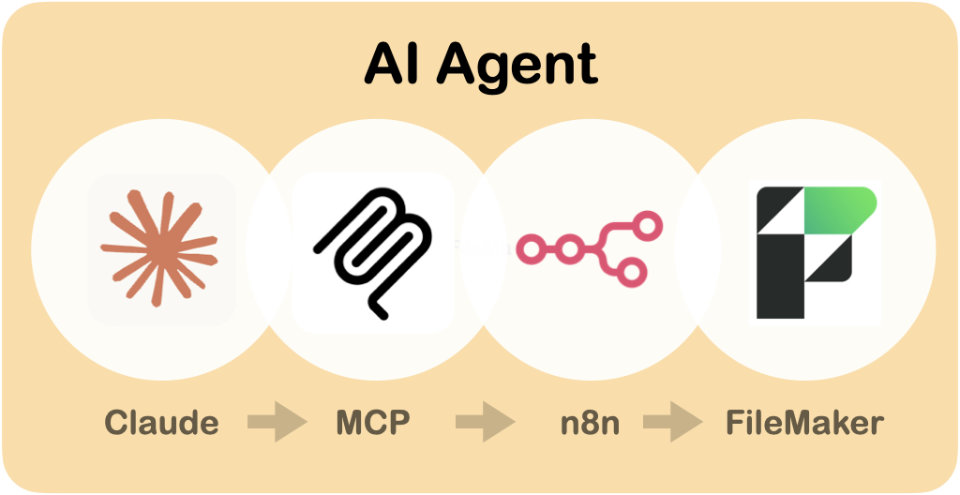
n8n can serve as an MCP wrapper to make FileMaker functions accessible to AI Agents.
In the demo, Claude Desktop used MCP tools to:
- Find and interpret customer data.
- Retrieve related invoices, analyze them, and have the AI Agent automatically send a professionally worded payment reminder to customers for outstanding items.
- Schedule customer meetings and automatically enter them into a Google Calendar; the AI Agent drafts and sends the invitation to the customer.
- Convert business card photos directly into contact records.
- Automatically generate new invoices for a customer based on product photos.
What’s special is that these tasks require only minimal preparation:
- The MCP tool gets a descriptive name so the AI Agent can recognize which functions are available.
- Within the n8n workflow, only the necessary input fields are created, along with text instructions on how to fill them in.
- No scripting, no JSON, no API calls – the AI Agent organizes the steps through MCP on its own.
VibeCoding for FileMaker
The second part focused on optimizing VibeCoding with Claude.
Claude is one of the most powerful AI developer tools, with deep knowledge of architecture, structure, and logic. It now also includes expertise in FileMaker scripts and the MBS Plugin.
However, hallucinations and invalid function calls can still occur when trying to generate new FileMaker code solely with Claude.
One solution is to provide Claude with relevant documentation and code examples.
Using n8n and Qdrant as a vector store, the full documentation of all MBS Plugin functions was made available as a RAG data source – supplemented with the MBS User Guides and all MBS blog posts.
An n8n AI Agent can now identify the best-suited MBS functions for any given task and provide a description of all necessary calls with appropriate parameters, plus code examples.
The „MBS Code Assistant“ can be accessed by Claude via an MCP server node in n8n to retrieve specific documentation for the chosen solution path and incorporate it directly into the generated code.
Currently, there is still no way to automatically transfer the code generated by Claude into the FileMaker script editor in text form. If limited to custom functions, the result can be pasted directly via copy & paste.
With more than 7,000 MBS functions, this method can be used to create even complex logic and make it available in FileMaker right away.
Outlook
The session concluded with a future scenario for an AI coding agent deeply integrated into the FileMaker development environment.
A complete documentation set for FileMaker and all relevant plugins and tools – with meaningful code examples – could be made available in an LLM-readable format on services like Context7.
Additionally, an automatable interface would be needed to remotely integrate generated code and objects into a FileMaker solution.
Conclusion
New techniques for AI Agents and open protocols like MCP open up a wide range of exciting opportunities in combination with FileMaker – both for integrating existing solutions and for AI-assisted development.
The examples shown demonstrate that these approaches can already be implemented quite easily today using an integration platform like n8n.
Those interested in the basics of n8n should also check out the earlier presentation „Building AI Agents with n8n and FileMaker“ (Part 1).
FileMaker itself also offers many exciting use cases for AI-based applications with its new Version 22.
With n8n, integrations with a wide variety of additional services can be implemented quickly and easily, and orchestrated together with AI Agents.
Overall, it becomes clear that the entire tool chain for AI Agent solutions is changing. Through the combination of tools, models, protocols, relevant content, optimized prompts, and alternative approaches to user interaction, new architectures emerge that extend the existing software landscape.
The presentation slides are available for download here:
FMDiSC – Marcel Moré – Building AI Agents (PDF 5 MB)
YouTube: FMDiSC August Meeting 2025
Marcel Moré: n8n and Al Agents (75 Minutes)

References
- n8n Website
- n8n Docs
- n8n: MCP Server Trigger node
- Claude Desktop
- Claude: Connect to Local MCP Servers
- Claude: Desktop Extensions – One-click MCP server installation for Claude Desktop
- Context7
- Context7 on github
Tags: Agents, AI, FileMaker, FMDiSC, MCP, n8n, VibeCoding, Vortrag